QR Code Payments - Everything Explained
QR codes are small square grid patterns that store information in a scannable form. You can scan them using a smartphone camera or use a third party QR code scanner to retrieve information inside.
Today, businesses use QR codes to make payments simple and fast. Instead of cash or cards, users just scan and pay within seconds. This method is growing very fast worldwide.
In fact, global QR payment transactions reached around $3 trillion in 2025. Also, this year, over a billion people are expected to use the QR code payment system globally.
QR Code for Payment - What Does it Mean?
A QR code for payment is a special type of QR code that stores payment details. When you scan it with a payment app QR Scanner, it connects you directly to a payment screen. You can then confirm the amount (or enter it manually) and complete the transaction.
This method removes the need for cash or cards. A Key Benefit - Your payments become:
- Quick
- Simple
- Digital
- Contactless
How Does a QR Code Payment Work?
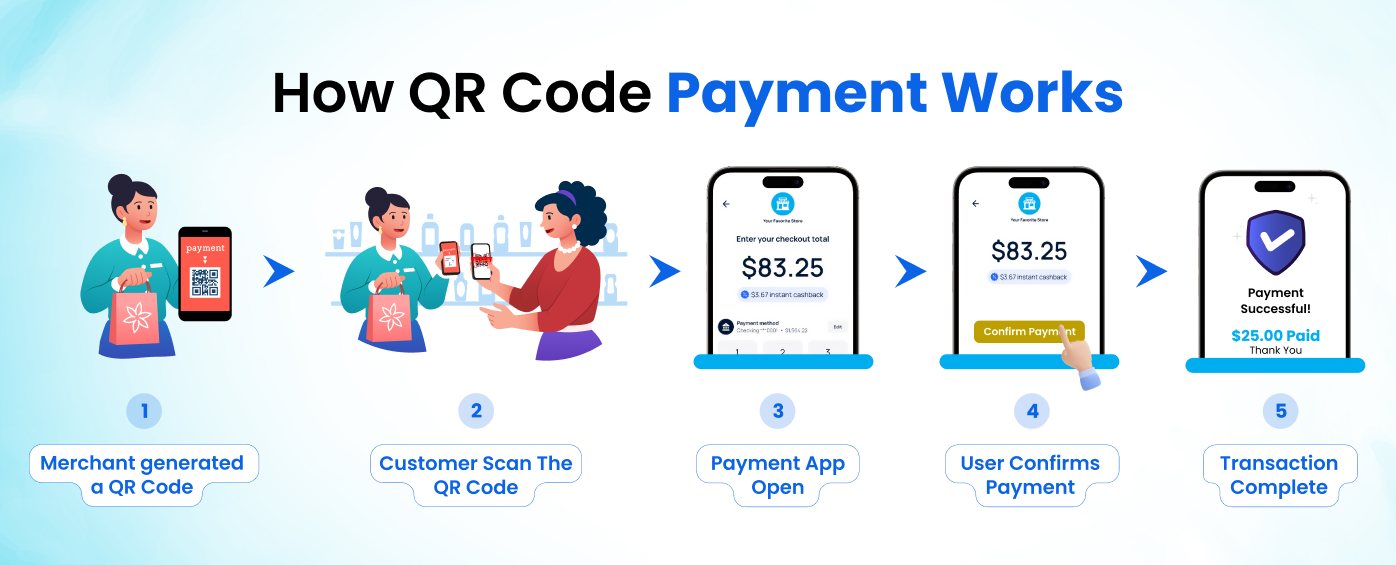
QR code payments follow a simple and quick process. Here is how it works step by step.
Step 1 - Merchant generates QR code
Seller creates a QR code using a payment app or system. This code contains the payment details.
Step 2 - Customer scans the code
Customer opens a payment app and scans the QR code using their phone camera.
Step 3 - Payment app opens automatically
After scanning, the app shows the payment screen with the merchant details.
Step 4 - User confirms payment
User checks the amount and taps to confirm the payment.
Step 5 - Transaction completes
Payment processes within seconds, and both sides get a confirmation.
Types of Payment QR Codes
Traditionally, QR codes are categorized into two types:
- Static QR codes
- Dynamic QR codes
Like traditional QR codes, payment QR codes can also be both dynamic and static.
1. Static Payment QR Codes
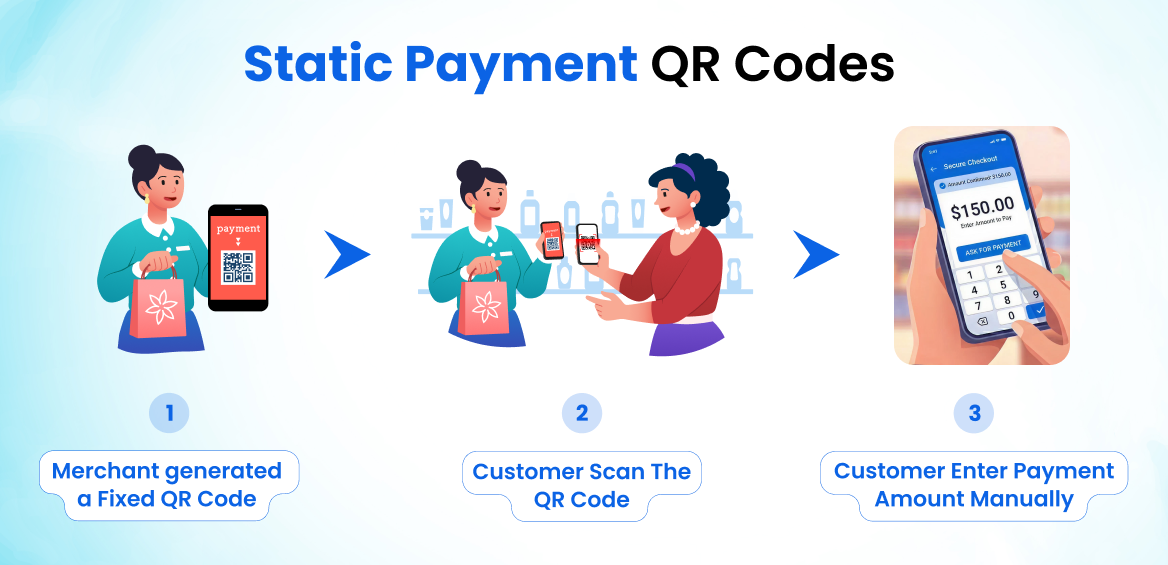
Static payment QR codes remain the same for every transaction. They store fixed payment details, e.g., merchant account. When a customer scans the code, they need to enter the payment amount manually.
These QR codes are easy to create and do not change over time. That is why small shops and individual sellers often use them. However, they offer less control and tracking compared to dynamic codes.
2. Dynamic Payment QR Codes
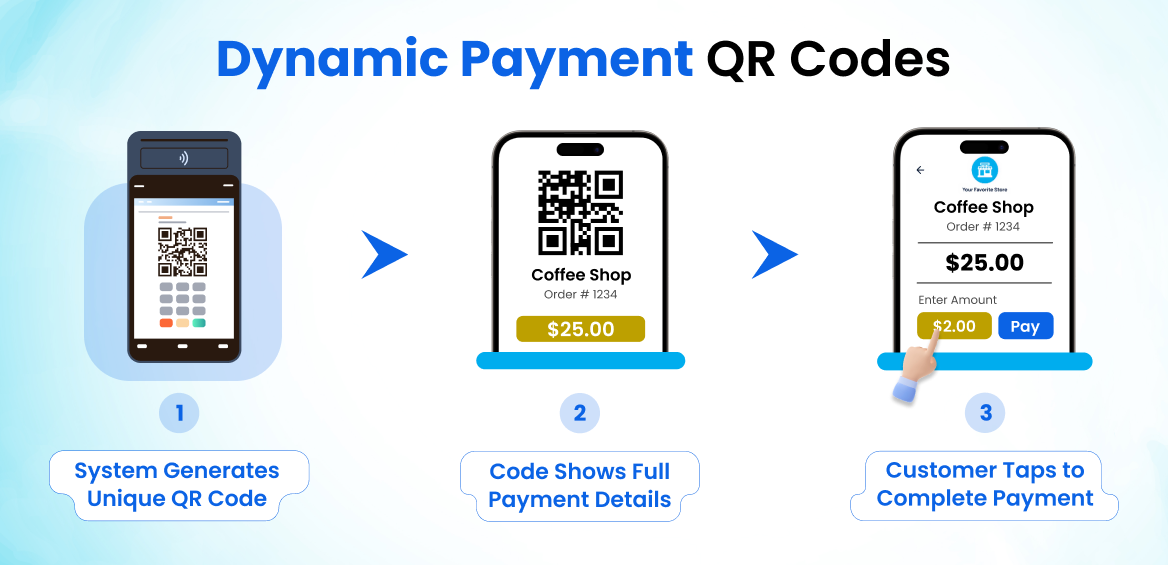
Dynamic payment QR codes are unique for each transaction. Some big merchants do offer systems that let businesses generate a unique payment code for each customer.
These codes include details like:
- Exact payment amount
- Order ID
- Transaction reference
When a customer scans the dynamic payment code, the payment screen already shows all the required information. Large businesses and online stores usually use dynamic QR codes.
How QR Codes are Used for Payments?
This year, QR codes are among the popular contactless payment methods. They provide a seamless experience both to the customers and the businesses. Instant payments, no waiting lines, and many other benefits.
Here are some common day to day scenarios where payment QR codes can be used.
1. Retail stores
Shops place a QR code at the counter. Customers scan the code and pay instantly without using cash.
2. Food points
Restaurants and cafes use QR codes on tables or bills. Customers scan and pay without waiting in line.
3. Ecommerce sites
Online stores show QR codes at checkout. Users scan the code using their phone and complete the payment quickly.
4. P2P payments
P2P means peer to peer payments. People send money to friends or family by sharing a QR code. The receiver shows their code, and the sender scans and pays.
5. Online subscriptions
Many services use QR codes for quick payments. Users scan the code and pay for monthly or yearly plans without entering details manually.
6. Donations
Charities and organizations place QR codes on banners, websites, or donation boxes. People can scan the code and donate instantly without filling out long forms.
How to Generate QR Code for Payments - Step by Step
Generating a payment QR code is very simple. Many of the payment service providers now offer simple portals through which they can easily be generated. Also, there are some third-party online tools that assist you with generating payment QR codes.
Here is a simple step by step process to easily generate a payment QR code.
1. Choose a Payment Service Provider
First, select a trusted payment provider. This can be a bank, mobile wallet, or Unified Payments Interface (UPI) service. Make sure it supports QR code payments.
2. Set up Merchant Account
Next, create your merchant account. You need to add basic details like:
- Your business name
- Bank account
- Contact information
Once done, your account will be ready to receive payments.
3. Generate QR Code
Now, generate your payment QR code. This can be done using the official app or a web portal provided by your payment service provider. Or you can also make use of third party UPI QR code generator.
4. Test QR Code
Before placing your QR code and start accepting payments via it, test it. And to test, begin by scanning it using a payment app. Perform a dummy transaction to check if it works correctly. You can also use an online QR scanner to confirm the details. This step helps you avoid payment issues.
5. Deploy Your Payment QR Code
Once tested, place your QR codes where customers can easily see and scan them. You can print it and display it at your shop. Or add it to your website or invoices.
That simple is the process to generate a QR code for payments.
Wrapping Up
Payments via QR codes have made transactions really fast. It eliminates the need to carry cash and cards. You just need a financial app with money in your account. Anywhere you can make an instant payment by scanning these codes via your smartphone.
These codes are not only beneficial for customers but also for businesses. As it lets them provide a better service experience to their customers. Buyers don’t have to wait for someone to bring them the payment receipts, nor do they have to stand in long queues only because the cashier is arranging the change on the cash counter.
If you are a business, it will be our best suggestion to you to start using payment QR codes today. Make your payment process smooth and clean.
Related Blogs
QR Code Scams Are Getting Smarter - Stay One Step Ahead in Spotting Fake QR Codes
Learn how fake QR codes are used for phishing, malware, & payment fraud, and how to spot them before scanning.
What are QR Codes? Are they Safe to Use?
Explore what QR codes are, how they work, and whether they are safe to use.
What Is a Barcode? How It Works, Benefits, and Common Uses
What Is a Barcode? How It Works, Benefits, and Common Uses