QR Code Size Requirements: How Small Can a QR Code Be?
QR codes are handy tools for sharing data and automating small digital tasks, such as making a wallet payment.
Today, we can scan QR codes just by pointing our phone cameras at them. We can also generate QR codes for free using online tools. They are used in many places, such as advertisements, billboards, brochures, pamphlets, and even business cards.
As you can see, there is a huge delta in the size of QR codes across all these media. Naturally, this raises some questions, such as “How small can a QR code be?” or “How large can a QR code be?”
We aim to answer these questions and help you make a better decision, design, and functionality-wise when creating QR codes.
How Small Can a QR Code Be?
The smallest practical QR code size is around 2 × 2 cm (0.8 × 0.8 inches) when printed. At this size, most modern smartphone cameras can scan the code reliably under good lighting conditions.
However, the exact minimum size depends on several factors, such as:
- The amount of data stored in the QR code
- the error correction level
- the printing quality
- the scanning distance
All of these factors are discussed in the next section in detail, so you can skip ahead if you want to and come back to this section later.
For example, a QR code that contains only a short URL can be printed much smaller because it requires fewer modules (dots). On the other hand, a QR code storing large amounts of data will be denser and may need to be larger to remain scannable.
A commonly used guideline is the 1:10 scanning rule. According to this rule, the scanning distance should be about 10 times the width of the QR code.
For instance:
- A 2 cm QR code can typically be scanned from 20 cm away.
- A 5 cm QR code can be scanned from about 50 cm away.
Using this rule, you can gauge what the size of the QR code should be by measuring how far away it will be scanned from. That’s why QR codes on billboards are huge, while on posters and brochures they are tiny.
What are The Factors That Control a QR Code’s Size?
If you are just looking for the short answer, it's 2 x 2 cm. But the real answer is more complicated than that.
How small you can make a QR code depends on many things. You cannot just make the code smaller if you feel like it. To understand this point better, let’s take a look at the various factors that control a QR code’s size.
Amount of Data Stored in The Code
A QR code consists of black dots placed on a white background. Then there are three squares at the corners of the code that help with alignment.
The more data you want to store in a QR code, the more black dots will be present. So, the resulting code will be quite dense. Now, you can’t make something dense too small because it would become impossible to see the individual dots.
Here’s an example from Dynamsoft of a dense QR code.
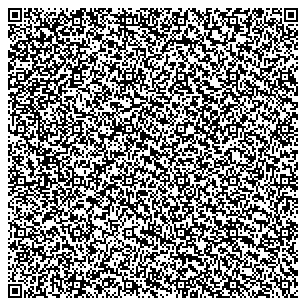
If you were to make this code smaller, it would become impossible to read. So, the smaller you need to create the code, the less data you can encode in it.
Here’s an example (also from Dynamsoft) of a small QR code that has very little data in it.

Common sense dictates that it cannot hold as much data as the bigger QR code. So you must reduce the amount of data to shrink a QR code.
Error Correction Level
Most QR codes have an error correction level. Error correction in QR codes refers to redundant data stored in the code to prevent data loss. In a code with error correction, even if you were to obscure or remove a part of it, the data would still be retrievable.
There are different error correction levels. They are:
- L (Low): Restores 7% of the data.
- M (Medium): Restores 15% of the data.
- Q (Quartile): Restores 25% of the data.
- H (High): Restores 30% of the data
Now, a QR code can only store 3 KB of data. When you set an error correction level, it takes space from the 3 KB limit. This means that you have less space for your data.
It also means that your QR code will be denser based on how much data you have added and the correction level. So, to create a small QR code, you need to either use only the low correction level or none at all.
You can test how big or small your QR code will be with different correction levels by using an online QR code generator. These are free tools that let you set an error correction level and let you input your data as well. You can check the final result to see how big or small the QR code is.
Print Area and Intended Use Case
One of the factors that dictates the size of your QR code is where you will print the code and how you intend for it to be used.
A QR code on a business card obviously needs to be small, and a QR code on a billboard needs to be large. But what about all the cases in between? For example, what about the QR code for public WiFi? How big or small does it need to be?
That would depend on where it is placed. For example, if it is placed on an A4 sheet in a foyer, then the code must be big enough to cover half the sheet. That way, people can scan it from a significant distance without. However, the very same code can be made smaller if it is placed more frequently in many places.
According to CoastLabel, you need to maintain a size-to-distance ratio of “1 : 10.” Meaning that for every 1 cm of QR code area, the distance for scanning needs to be 10 cm.
Using this formula, you can get a general idea of how small you can make your QR code depending on the scan distance.
Colors and Design
Traditionally, a QR is black and white. A white background with black dots on it. The shape is typically a square, and there are three alignment blocks in the corners (except one).
However, modern QR codes can have different colors on a white background. They can have logos in the center, and the shape can be round as well.
Just take a look at this design you can create for free.
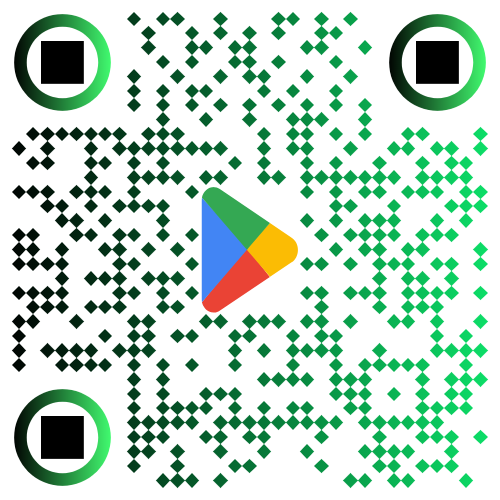
The code has multiple colors, a logo, and diamond-shaped dots. This kind of logo can only look good against a light background. In a dark background or high-brightness environment (e.g., in sunlight), this image would be hard to discern for both humans and QR scanners.
So, you have to test your QR code designs in different lighting conditions and backgrounds to check if you can make them smaller or not. A sophisticated design makes it harder to minify a QR code because all the different details become mushed together and indiscernible.
So, you need simple designs if you want to create really small QR codes.
What Are the Best Practices for Creating Small QR Codes?
If you wish to create minuscule QR codes. Here are some best practices you should use to enable smaller sizes.
Minify URLs and Links
QR codes are most often used to provide links to a website. Typically, the links take the users to some marketing landing page that was specifically made for a particular campaign.
If you want to make such a QR code really small without losing clarity or scannability, then you must reduce the amount of data stored on it.
Since a QR code can only store 4,296 characters, you need to be careful with your link size. Use a URL shortener to reduce the number of characters in your links.
As a result, your QR code will have fewer dots and retain a higher clarity even in a smaller size.
Avoid Complicated Designs and Logos
To maintain clarity and scannability in a small QR code, keep the design simple. A black and white code sports the highest contrast ratio, and a square shape is easy to scan. Any complication in the design creates congestion, which means that you have to keep the size large to avoid it.
Additionally, using colorful combinations and unorthodox shapes means you need a higher resolution and better lighting to make out the QR code. While you can change the lighting somewhat easily, the resolution of a small QR code can’t exceed a certain limit.
So, it is better to just avoid complicated designs and logos and create a simple QR code that can retain its clarity even in a small size.
Test With Different Devices and Lighting Conditions
Once you have created a small QR code, test it under different conditions. This will show you whether the QR code is suitable for scanning or not.
If your QR code is too small, it will not be scanned by devices that have a weak camera. Even devices with great cameras might have different results in unique lighting conditions.
So, test your QR codes in different conditions and only go ahead if they succeed in more than 90% of scenarios.
Scan From Different Distances
With small QR codes, scanning distance matters a lot. So you need to test your QR codes by scanning them from different distances. The testing distances should account for real-world usage and not an ideal scenario.
If your code is unscannable at those distances, increase the size and test again until it works.
Conclusion
So, there you have it, the long answer to the question. In summary, we can say that the smallest a QR code can be depends on its design, error correction, data size, and scanning distance. By carefully testing your code and following best practices, you can find the right balance between a small size and good visibility/scannability.
FAQs About QR Code Size
What is the minimum size of a QR code?
The minimum recommended QR code size is 2 × 2 cm (0.8 × 0.8 inches) for reliable scanning. Smaller QR codes may work in ideal conditions, but they can become difficult for some devices to scan.
Can a QR code be smaller than 2 cm?
Yes, technically, QR codes can be smaller than 2 cm, especially if they contain very little data. However, scanning reliability decreases significantly, particularly for phones with lower-quality cameras. So it is unwise to make them that small.
What is the best QR code size for printing?
The ideal QR code size depends on where it will be used. You can use the following table to get an idea.
| Use Case | Recommended Size |
|---|---|
| Business cards | 2 × 2 cm |
| Flyers or brochures | 3 × 3 cm |
| Posters | 4–6 cm |
| Billboards | 10 cm or larger |
Does QR code size affect scanning?
Yes. If a QR code is too small, scanners may not be able to distinguish the individual modules (dots). Larger QR codes are easier to scan, especially from a distance or in poor lighting conditions.
Do colors affect QR code size?
Colors do not directly affect the size, but low contrast designs can make small QR codes harder to scan. High contrast combinations, such as black on white, work best for reliable scanning.
How much data can a QR code store?
A QR code can store different amounts of data depending on the format:
- Numeric: up to 7,089 characters
- Alphanumeric: up to 4,296 characters
- Binary: up to 2,953 bytes
However, storing more data increases the density of the QR code, which may require a larger size for accurate scanning, so keep that limitation in mind.
Related Blogs

How to Generate a QR Code?
Learn how to create QR codes for links, Wi-Fi, email, SMS, Facebook, and locations with this simple guide.
QR Code Scams Are Getting Smarter - Stay One Step Ahead in Spotting Fake QR Codes
Learn how fake QR codes are used for phishing, malware, & payment fraud, and how to spot them before scanning.
7 Reasons Why Your QR Code Is Not Working
Learn our comprehensive guide on seven reasons why your QR Code is not working